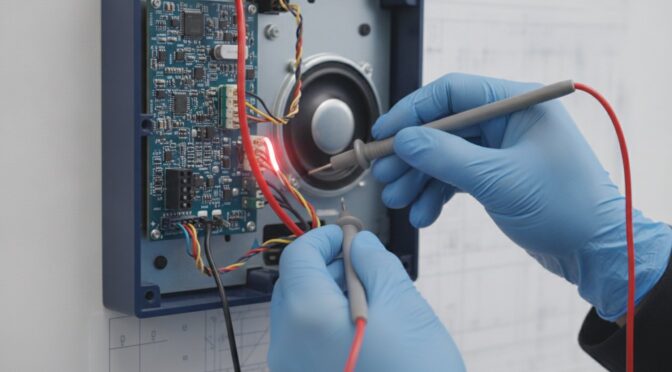
You press the talk button to verify a visitor at the lobby door, but instead of a clear response, you’re met with a wall of harsh static or total silence. In a busy NYC apartment building, this isn’t just a minor inconvenience; it’s a significant security risk that leaves residents unable to identify who they’re letting inside. We understand the frustration of missed deliveries and the persistent humming noises that signal a system in distress. Whether the issue is a single malfunctioning handset or a building-wide audio failure, the goal is always to restore reliable communication through steady, logical troubleshooting.
This guide provides a professional framework for an intercom audio not working repair, helping you diagnose whether the fault lies in the amplifier, the wiring, or the tenant station itself. You’ll learn how to isolate specific hardware failures in legacy systems like Lee Dan or modern units like Comelit and Siedle. We will outline a methodical approach to identify the root cause and determine the most practical path to restoration for your property, focusing on sustainable fixes rather than immediate, costly replacements.
Key Takeaways
- Learn to distinguish between building-wide audio failures and isolated station malfunctions to quickly narrow down the source of the problem.
- Discover how environmental exposure impacts outdoor microphone elements and speaker cones, leading to persistent static or complete sound loss.
- Follow a methodical diagnostic process for an intercom audio not working repair by verifying handset wiring and performing system-wide sanity checks.
- Gain insights into technical troubleshooting for specific brands like Aiphone and Siedle, including the nuances of digital bus versus analog audio.
- Understand why maintaining legacy hardware from brands like Lee Dan or Tektone is often a more sustainable solution for NYC properties than a full system replacement.
Common Symptoms of Intercom Audio Failure
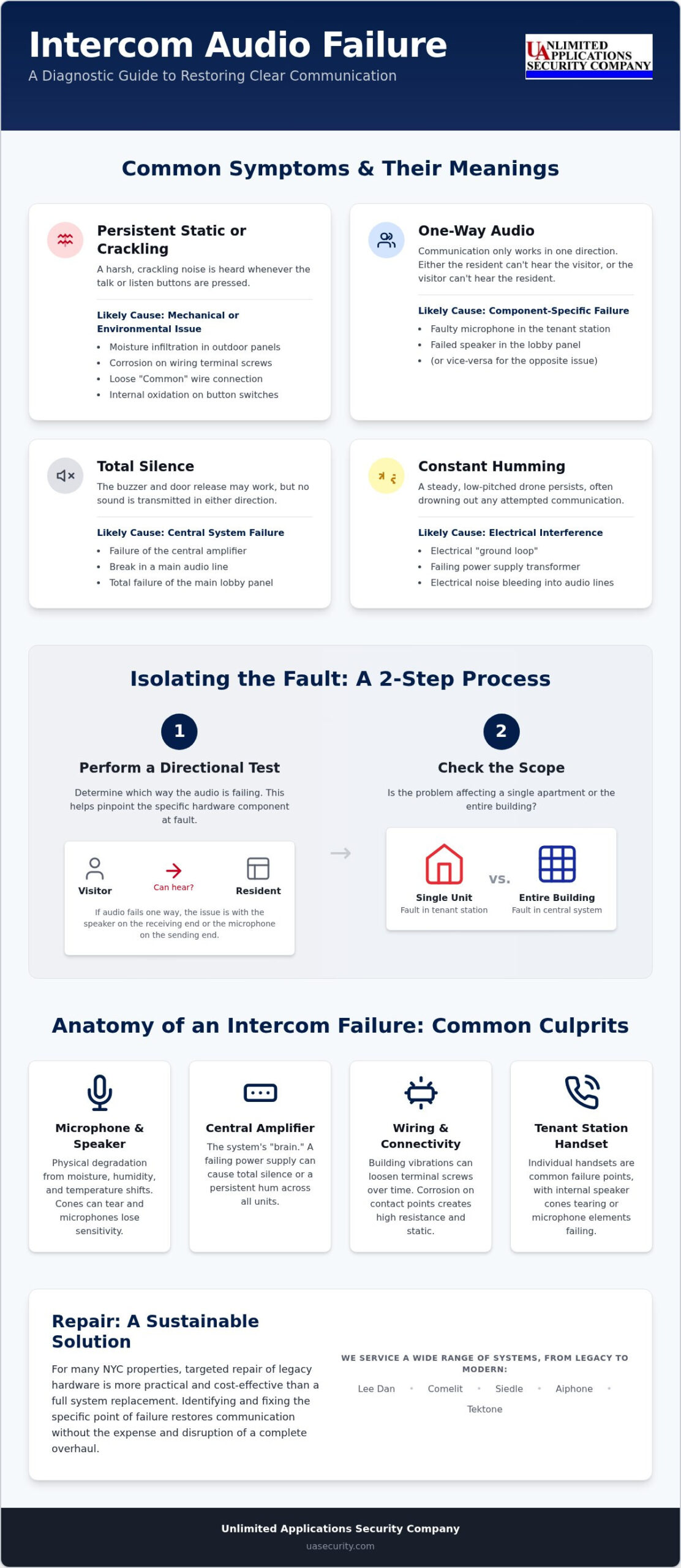
Recognizing the specific sound of a malfunction is the first step toward a successful intercom audio not working repair. Most residents and property managers report issues that fall into four distinct categories: persistent crackling, one-way communication, total silence, or a low-frequency hum. While these symptoms are frustrating, they serve as diagnostic clues that help a technician identify whether the fault is in the wiring, the amplifier, or the individual station. Before calling for service, it’s helpful to observe exactly how the system behaves during a call.
- Persistent static: A “crackling” noise that occurs whenever the talk or listen buttons are engaged.
- One-way audio: The visitor can hear the resident clearly, but the resident hears nothing from the lobby, or vice versa.
- Total silence: The buzzer and door release function correctly, but no sound travels in either direction.
- Constant humming: A steady, low-pitched drone that persists even when no one is speaking, often drowning out voices entirely.
Identifying One-Way vs. Two-Way Audio Loss
Isolating the direction of sound loss is a critical diagnostic step. To do this, perform a directional test. If a resident can hear the visitor but the visitor hears nothing, the issue typically resides in the resident station’s microphone or the lobby panel’s speaker. Conversely, if the visitor’s voice is heard but the resident’s voice doesn’t travel down, the lobby microphone or the station’s talk circuit is likely at fault. This directional failure helps determine if the problem is localized to one apartment or stems from a shared component in the central Intercom system. If the loss is two-way and affects every apartment in the building, the central amplifier or the main lobby panel has likely failed.
The Meaning Behind Static and Humming
Static and humming provide different technical signals about the state of the hardware. A constant, low-pitched hum usually points to a “ground loop” or a failing power supply transformer. This electrical noise bleeds into the audio lines and interferes with speech. Static or crackling is more often a mechanical issue. In NYC’s environment, moisture often infiltrates outdoor panels, leading to corrosion on terminal screws. This creates a high-resistance connection that breaks the audio signal into intermittent bursts of noise. When performing an intercom audio not working repair, we often find that simply cleaning these terminals or tightening a loose common wire restores the signal. If the static only happens when a button is pressed, the switch itself may have internal oxidation that requires professional cleaning or replacement.
The Anatomy of Intercom Audio: Why Sound Fails
An intercom system relies on a sequence of hardware components working in unison. When you require an intercom audio not working repair, the failure is usually a physical breakdown of a specific part rather than a software glitch. The central amplifier acts as the “brain,” boosting low-level signals so they can travel between the lobby and the apartment. In many NYC buildings, the wiring hubs that connect these signals are subjected to constant building vibrations from nearby subways or traffic. These subtle movements can loosen terminal screws over decades, eventually breaking the circuit and cutting off communication.
Effective audio equipment troubleshooting requires understanding that sound quality depends on clean electrical paths and intact physical membranes. If one link in this chain fails, the entire communication path collapses. Identifying the specific component at fault is the first step toward a pragmatic, cost-effective restoration.
Microphone and Speaker Degradation
Lobby panels are the front line against the elements. Older systems often use carbon microphones that become “packed” and lose sensitivity over time. You can sometimes temporarily fix these by tapping the panel, but replacement is the only sustainable solution. Modern electret microphones are more resilient but remain highly susceptible to moisture and humidity. Speaker cones in apartment handsets are equally vulnerable. These thin membranes can tear or the internal voice coil can seize. A “blown” speaker often manifests as a muffled or heavily distorted voice that is impossible to understand. In NYC, the combination of extreme temperature shifts and high humidity accelerates the physical degradation of these paper or plastic cones.
Wiring and Connectivity Issues
Most multi-tenant systems use a “Common” wire to facilitate audio transmission across the entire building. If this single connection is loose at the main panel, every unit in the building will experience audio loss. Oxidation on terminal blocks is another frequent culprit. This layer of “electronic rust” creates high resistance, which effectively blocks the low-voltage signals required for clear speech.
You might also encounter “crosstalk,” where you hear muffled conversations from other apartments on your own line. This happens when the insulation on the wires inside the building’s riser has decayed, allowing signals to bleed between adjacent lines. Identifying these faults requires tracing the signal path from the apartment station back to the central hub. If your building’s communication is becoming unreliable, consulting an experienced intercom repair team can help identify which specific component has reached the end of its service life.
Brand-Specific Audio Troubleshooting
Intercom systems from different manufacturers utilize vastly different architectures, meaning a solution for one brand may be entirely irrelevant to another. When performing an intercom audio not working repair on an Aiphone system, for instance, we often examine the multi-wire riser. If the call tone functions but speech is absent, the fault usually lies in the specific audio amplifier module or a break in the common audio line that services the building. This type of technical nuance is why a brand-specific diagnostic approach is essential for NYC properties. A generic fix rarely addresses the underlying hardware requirements of these specialized systems.
Luxury Systems: Siedle and Comelit
Siedle and Comelit systems represent the high end of the market, often utilizing digital bus technology where audio and data share the same path. If you experience a loss of audio sync on a Siedle system, resetting the system controller can sometimes restore the digital handshake between the lobby and the apartment. For Comelit video systems, it is common to see a perfect video feed while the audio fails entirely. This is frequently caused by incorrect audio gain settings on the panel’s internal potentiometer or microscopic oxidation on the contact points of the handset cradle. Cleaning these high-end contact points with an electronics-grade cleaner often restores clarity without the need for new hardware.
Legacy Systems: Lee Dan and Tektone
Many pre-war buildings in New York still rely on Lee Dan and Tektone 4-wire or 5-wire analog systems. These units are incredibly durable but eventually suffer from amplifier failure or microphone degradation. In these legacy setups, a loud humming noise often signals that the central amplifier’s capacitor has reached the end of its life. Rather than performing a full building upgrade, replacing individual handset microphones or the central amplifier can often extend the life of these systems for several years.
Choosing a specialist for intercom repair NYC is a pragmatic way to maintain building security without the expense of a complete overhaul. We prioritize these sustainable fixes because we understand the value of reliable, existing infrastructure. When a microphone fails in a Tektone station, we focus on restoring that specific component to ensure the two-way communication remains crisp and dependable for the resident.
Step-by-Step Intercom Audio Diagnostic Guide
A logical diagnostic sequence prevents unnecessary component replacement. When you begin an intercom audio not working repair, you must move from the most accessible points toward the central infrastructure. Following this structured path helps isolate whether the failure is a localized wiring break or a systemic hardware collapse. We recommend documenting each finding to provide a clear history for a technician if the issue persists beyond basic troubleshooting.
- Step 1: Perform a system-wide “sanity check” to determine if the audio failure affects only your apartment or the entire building.
- Step 2: Inspect the physical handset or wall station for loose terminal screws or disconnected wires.
- Step 3: Use compressed air to clear dust and grime from the external microphone and speaker grilles on the lobby panel.
- Step 4: Locate the central power supply and amplifier to check for “blown” fuse indicators or status LEDs.
- Step 5: Document specific failure patterns, such as whether the static is constant or only occurs when the door release is pressed.
The “One vs. All” Diagnostic Rule
Determining the scope of the failure is the most important diagnostic step. If a single unit fails while your neighbors report clear audio, the problem is likely a faulty handset or a break in the branch wire serving your specific apartment. However, if the whole building loses audio, the fault almost certainly lies in the central amplifier or the main lobby panel. Coordinating with a neighbor for a quick test can save hours of unnecessary work. This simple verification narrows the search area from hundreds of feet of building-wide wiring down to a single device.
Safe DIY Maintenance
Residents can safely perform basic maintenance without specialized tools. Use an electronic contact cleaner on the handset buttons and the hook switch to remove oxidation that causes crackling. It’s also helpful to check for “pinched” wires behind the wall-mounted plate. These wires are often crushed during initial installation and can eventually fray due to building movement. You should stop troubleshooting if you encounter complex digital circuit boards or high-voltage components. Attempting to repair these without brand-specific training can cause permanent damage. If these initial steps don’t restore sound, you should request a professional intercom diagnostic to identify deeper electrical faults.
Professional Intercom Repair in NYC: Restoring Clear Communication
Repairing an intercom system in New York City requires more than basic electrical knowledge. The city’s unique infrastructure presents environmental challenges that standard troubleshooting guides often overlook. Pre-war buildings frequently house dense wiring risers that have been subject to decades of temperature fluctuations and humidity. In coastal neighborhoods like Long Island City or Lower Manhattan, salt air accelerates the corrosion of copper terminal points. Furthermore, the constant vibration from nearby subway lines and heavy truck traffic can slowly loosen physical connections within a lobby panel. A successful intercom audio not working repair in this environment demands a technician who understands these localized stressors.
Professional restoration ensures that every component, from the microphone diaphragm to the central amplifier, operates within its original specifications. While a DIY fix might temporarily restore sound, a certified specialist identifies the underlying cause of the failure to prevent it from returning. This technical precision is especially critical for proprietary systems like Siedle and Aiphone, where specific voltage requirements and digital protocols must be met to maintain system stability.
The UAS Advantage in NYC
Unlimited Applications Security Company (UAS) brings over 30 years of experience to every service call across the five boroughs. We have navigated the complexities of NYC building infrastructure since 1994, developing a deep familiarity with both high-end modern systems and legacy hardware. Our expertise extends beyond simple audio fixes. We understand how your intercom must integrate perfectly with electric strikes and magnetic locks to ensure the building’s physical security remains uncompromised. Whether your property utilizes a contemporary Comelit video system or a durable Tektone buzzer unit, we focus on pragmatic, sustainable repairs that respect the building’s existing investment.
Restoring Peace of Mind
Clear, two-way audio is the foundation of building security. When a resident cannot hear a visitor, they’re forced to choose between denying entry to a legitimate delivery person or buzzing in an unidentified individual. This compromise creates unnecessary risk for every tenant in the building. Restoring functional communication ensures that emergency services, couriers, and guests can be verified instantly. Beyond the immediate repair, we provide guidance on preventative maintenance, such as periodic terminal cleaning and housing seals, to protect your hardware from the city’s harsh conditions. If your system is currently failing, the most reliable path forward is to schedule a professional intercom diagnostic to restore your building’s communication and safety.
Restoring Reliable Communication to Your Property
A non-functioning intercom is more than a technical glitch; it’s a gap in your building’s security perimeter. By following a methodical diagnostic process, you can often determine if the issue is a localized station failure or a systemic wiring break. Understanding the impact of NYC’s unique environmental stressors, from humidity to building vibrations, allows for a more targeted and sustainable approach to restoration. Whether you are managing a legacy buzzer system or a high-end digital interface, identifying the specific hardware failure point is the most efficient path to clear sound.
If your own troubleshooting steps don’t resolve the issue, seeking a professional intercom audio not working repair ensures the long-term stability of your system. Unlimited Applications Security Company brings over 30 years of NYC security experience to every project. As locally owned and operated specialists, we are brand-certified for systems including Siedle, Aiphone, and Comelit. We focus on practical, expert solutions that restore your peace of mind and keep your property accessible. Get Expert Intercom Repair in NYC Today and ensure your building remains secure and connected.
Frequently Asked Questions
Why can I hear my visitor, but they cannot hear me on the intercom?
This indicates a directional audio failure, specifically in the resident-to-visitor path. The most likely causes are a faulty microphone in your apartment station or a malfunctioning speaker in the lobby panel. If your neighbors also experience this, the lobby speaker is probably the culprit. In a single-unit failure, the issue usually lies in the handset’s internal wiring or a worn-out talk button that no longer creates a clean connection.
How do I fix static or crackling noises on my apartment intercom?
Static is usually caused by oxidation on electrical contact points or loose terminal connections. You can often resolve this by using a professional-grade electronic contact cleaner on the handset’s hook switch and buttons. For an intercom audio not working repair in NYC, we frequently find that moisture from the city’s humid climate has corroded the terminal screws behind the wall plate. Tightening these screws or cleaning the wires often restores clear sound immediately.
Can I replace just the handset if the audio is not working?
Yes, you can often replace a single handset if the diagnostic confirms the failure is localized to your unit. This is a common solution for brands like Lee Dan or Tektone where individual stations are still manufactured. However, the new station must be exactly compatible with the building’s existing voltage and wiring configuration. If the audio failure persists after replacement, the problem likely exists in the building’s shared riser wiring or the central amplifier.
What causes a constant humming sound in an intercom system?
A constant low-frequency hum is typically the result of an electrical grounding issue or a failing power supply transformer. This “60-cycle hum” occurs when alternating current bleeds into the audio lines. In many NYC apartment buildings, this noise signals that the central amplifier’s filtering capacitors have reached the end of their service life. A professional technician can usually replace the specific power component rather than requiring a complete system overhaul.
Is it possible to repair an older intercom system, or do I need a full replacement?
Most older systems from durable brands like Lee Dan or Tektone are highly repairable. We prioritize hardware maintenance and component-level fixes because these analog systems were built for longevity. As long as the building’s internal copper wiring remains intact, replacing a central amplifier or individual station is often more cost-effective than a full replacement. We only recommend a full upgrade when replacement parts are no longer manufactured or the wiring has significantly decayed.
How long does a typical intercom audio repair take in NYC?
A standard diagnostic and repair for a single apartment station typically takes between one and two hours. If the issue involves building-wide audio failure, the process may take longer as the technician must trace the fault through the lobby panel, the central amplifier, and various junction boxes. Given the complexity of NYC building infrastructure, having a specialist who understands the specific layouts of pre-war and modern multi-tenant properties ensures a much faster resolution.
Why does my intercom audio only stop working when it rains?
Audio failure during rain is a clear indicator of moisture infiltration in the outdoor lobby panel or an exposed junction box. Water creates temporary short circuits or high-resistance paths that drown out speech with static or silence. In NYC, the combination of rain and city pollutants can lead to rapid corrosion on exposed circuitry. Sealing the outdoor housing and applying a protective coating to the terminal blocks can prevent these weather-related interruptions.
What is the most common reason for intercom audio failure in multi-tenant buildings?
The most frequent cause of failure is a loose or oxidized “common” wire in the building’s riser. This single wire facilitates audio for every unit; if it disconnects at the lobby panel or a central hub, the entire building loses sound. Other common issues include worn-out hook switches on apartment handsets and microphone degradation in weather-exposed outdoor panels. Regular maintenance and prompt intercom audio not working repair services help prevent these small faults from becoming building-wide outages.